
Input Translator
A lightweight browser extension for instant text translation in any input field. Translate directly without switching tabs - perfect for international communication and content creation.
Powerful Translation Features
Everything you need for seamless translation in any browser input field
Instant Translation
Translate directly in input fields without switching tabs or copying text
Free by Default
Uses Google Translate by default, with Microsoft Translator as an alternative - no configuration required, completely free to use
AI Support
Configure OpenAI API or compatible LLM providers (OpenRouter, etc.) for enhanced accuracy
Universal Compatibility
Works with text inputs and rich text editors across all websites
Multiple Triggers
Triple space, hotkey (Alt+T), or context menu - choose your preferred method
Privacy First
No personal data collection, API keys stored locally in your browser
Translation Triggers
Multiple ways to activate translation - choose what works best for you
Triple Space
Press space 3 times to translate current input
Type text + [Space] [Space] [Space]Hotkey
Press Alt+T to translate selected text (customizable)
Select text + Alt+TContext Menu
Right-click and select "Translate Text"
Right-click → Translate TextConfiguration Options
Customize Input Translator to match your workflow
Basic Settings
API Configuration (Optional)
OpenAI
OpenRouter or Compatible Services
Quick Start Guide
Get up and running in under a minute
1. Install Extension
Download Input Translator from your browser's extension store
2. Type in Any Field
Start typing in any input field on any website
3. Press Space 3 Times
Triple space to instantly translate your text
Available On
Works on all major browsers — including mobile. Yes, you can use extensions on your phone!
Desktop

Privacy & Security
- • No personal data collection
- • API keys stored locally in browser
- • Text only sent to configured translation service
- • Open source and transparent
Frequently Asked Questions
Why doesn't the triple space trigger work?#
How do I disable the triple space trigger? It keeps firing accidentally.#
Click the Input Translator icon in your browser toolbar to open the settings, then turn off Triple-Space to Translate.
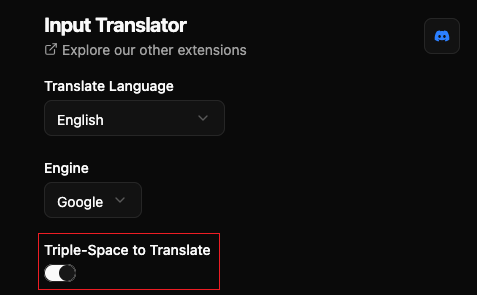
You can still translate anytime with the keyboard shortcut (Alt+T by default, see how to change it) or the right-click context menu.
Is it free to use?#
How do I change the translation hotkey?#
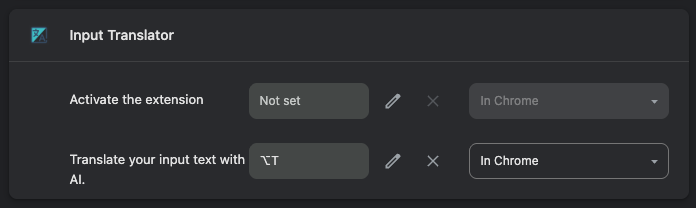
In Chrome or Edge, open chrome://extensions/shortcuts and set a new key for "Translate your input text with AI".
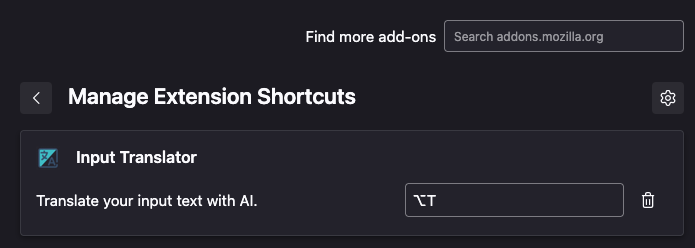
In Firefox, open about:addons, click the gear icon, and choose "Manage Extension Shortcuts".
My API key isn't working, what should I do?#
Which languages are supported?#
How do I change the translation target language?#
Need Help?
Multiple ways to get support and connect with the community